
Food Hunt Level 1033 Walkthrough
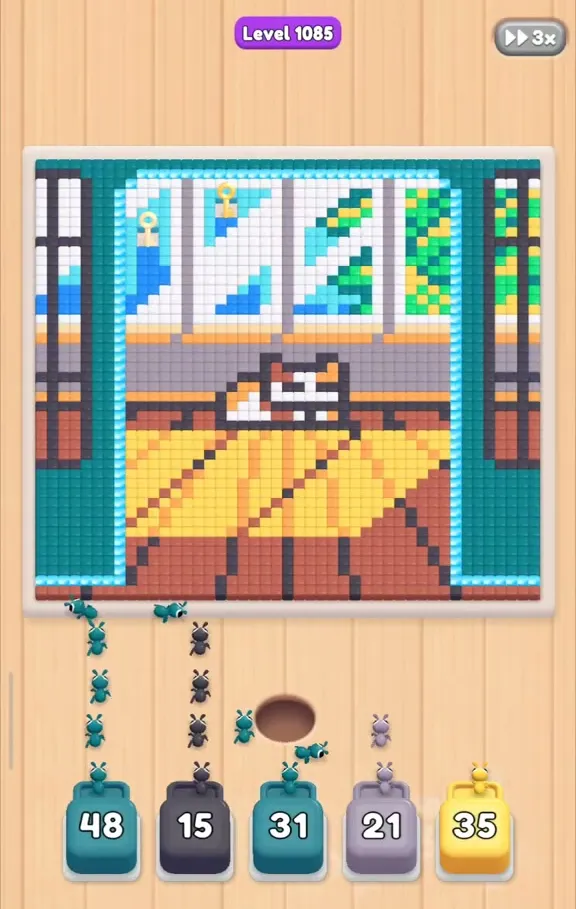
Clear Food Hunt level 1033 by opening with teal 48, yellow 14, teal 29 and navy 29, then cycling useful boxes through the five slots. This sleeping orange cat lies on a wooden floor beside a large curtained window, with 52 boxes in 12 colors to remove. Favor the big 50-90 boxes when available and use 3-20 boxes as short refills. The closing stretch includes three red boxes and brown boxes numbered 87, 87 and 90, with a brown floor pixel disappearing last.

Beige 22 creates the longest wait: it settles at 20 in slot 3. Other pauses include light blue 33 at 8, orange 20 near the finish and teal 36 at 19. Separately, a golden lock at the top of queue column 1 prevents access to the boxes beneath it until you tap the lock. Distinguish that queue obstruction from a box waiting for covered pixels.
| Picture | Orange cat asleep on a wooden floor beside a large curtained window |
|---|---|
| Boxes in the level | 52 |
| Colors | 12 |
| Opening slots | 4 filled first; white 41 brings slot 5 into use |
| Queue obstruction | Golden lock above column 1 |
| Final pixel | Brown wooden floor |
Sleeping Cat Answer Key: Opening Pairs and Brown Finish
Teal 48, yellow 14, teal 29, navy 29; white, green, teal and navy; beige, orange, lilac and light blue through the middle; red and the large brown boxes at the end.
Follow the numbered pairs in the steps to identify each return of teal or navy. Teal appears more often than any other color, so its repeated entries belong to different passes through the cat and window. The first four picks establish the opening, after which the lineup grows to five working slots. Brown 87, another brown 87 and brown 90 belong in the second half of the queue. Keep the intervening red picks moving alongside the other active colors rather than reserving an empty space for every later brown.
Window and Wooden Floor Walkthrough
- Establish the first four boxes. Tap teal 48, yellow 14, teal 29 and navy 29 in that sequence. Each pick takes the next available slot, filling positions 1 through 4. Teal begins opening the upper parts of the cat and window scene, while navy works into the deeper sections. These are the opening assignments; the next white box belongs to the following stage.
Video walkthrough of level 1033
The sleeping-cat clear shows repeated teal passes, the long beige wait and the late brown floor boxes. Compare the numbered refills with the video when several slots become available together.

- Expand to five working slots. Continue with white 41, green 14, teal 53 and navy 20. White 41 brings the fifth slot into play, and all five positions now take part in the clear. Refill a space promptly when the queue supplies a useful next box. Keep the large runs moving instead of spending every newly available place on a small box that has no open pixels yet.
- Park beige and pass the teal pair. Play beige 22 and orange 30, followed by teal 61 and navy 17. Beige occupies slot 3 and settles at 20 for the longest pause of this level. Its next pixels become accessible only after the surrounding colors have progressed into the relevant layer. Let teal and navy continue their work around that pause instead of repeatedly tapping beige to try to change its counter.
- Replace the middle wave. The next sequence is teal 31, lilac 20, yellow 34, light blue 12 and navy 68. When three spaces clear close together, refill them with lilac 47, white 36 and navy 70. Follow those with white 55, lilac 42 and yellow 45. White needs these later passes to finish its layers, so a completed white box does not mean that the scene has no white work left.
- Cycle teal through slot 1. Continue with teal 57, green 15, teal 29, white 30, teal 36, navy 27 and blue 3. Slot 1 repeatedly handles teal, with teal 36 eventually stopping at 19. After that come orange 58, white 49 and light blue 33, the latter pausing at 8. Slots 4 and 5 can remain empty during this section because the relevant pixels are still covered, so wait for access instead of adding an unusable refill.
- Unlock the queue and finish brown. Check the golden lock above column 1 and tap it if it is blocking the remaining queue. Continue red 22, brown 87, yellow 41 and beige 5, which completes beige, then lilac 35, orange 20, green 14, light blue 13, white 42 and blue 28. The final series is yellow 57, navy 86, lilac 28, red 48, brown 87, red 50, navy 56, yellow 32 and brown 90. That last brown run removes the final wooden-floor pixel.
Golden Lock or Covered Pixels on Level 1033?
If nothing new is selectable, inspect the upper cell in column 1 before studying the cat. The golden lock hides the queue below it, and a tap on that lock restores access. Empty slots 4 and 5 have a different explanation: their next useful colors may still be covered. Keep four or five productive boxes running where possible, but a dead refill will not help those empty positions.
For a counter that refuses to fall, identify the exact pass. Beige 22 waits at 20 in slot 3; light blue 33 holds at 8 in slot 4; teal 36 remains at 19 in slot 1. Orange 20 first parks at 9 in slot 3 and later stays at 1 until the ending, while white 41 also lingers in slot 1. These boxes resume after neighboring colors clear their routes, without repeated taps on the waiting boxes.
Frequently Asked Questions
How do you beat Food Hunt level 1033?
Open teal 48, yellow 14, teal 29 and navy 29, then use white 41 to bring in slot 5. Clear the column 1 golden lock when needed and work through all 52 boxes to brown 90.
What is the starting color sequence for level 1033?
Teal 48 leads, followed by yellow 14, teal 29 and navy 29. Those picks fill the first 4 slots; white 41 is the next opening milestone.
Why does beige 22 take so long?
Beige 22 holds at 20 in slot 3 because neighboring colors cover its next pixels. Its route opens nearer the middle of the queue, and the later beige 5 finishes that color.
What should I check when the queue stops?
Look for the golden lock at the top of column 1 and tap it to reveal the boxes below. A teal 36 box stalled at 19 is a separate pixel-access pause and will resume when its neighbors disappear.
Are empty slots a bug in the sleeping-cat level?
Slots 4 and 5 can sit empty while the needed colors remain covered. Avoid forcing a box into that gap; light blue 33 already illustrates the access problem by stopping at 8 until the surrounding pixels clear.
Read next



Stuck somewhere else? Pick another number on the Food Hunt levels page, or start with the Food Hunt walkthrough basics if the slots and boxes still feel new.