
Food Hunt Level 721 Walkthrough
Beat Food Hunt level 721 by opening with orange, salmon and teal, moving through the yellow and green layers, and saving the charcoal finish. You will use 55 boxes across 12 colors to clear an orange striped cat pressed against a brown lion with a gold crown and a red tongue. Work within four slots until pink unlocks the chained fifth slot around the middle; the last pixel is charcoal.

Two long waits restrict your choices: red in the first slot is covered by yellow, and white in the fourth slot lasts into the endgame. White in the second slot also waits for its neighboring colors. With only four positions available initially, adding more inaccessible colors can prevent the useful boxes from entering. The dark sky, yellow stripes and green leaves behind the animals also belong to the picture you are clearing.
| Picture | Orange striped cat beside a crowned brown lion with a red tongue, dark sky, yellow stripes and green leaves |
|---|---|
| Boxes in the level | 55 |
| Colors | 12 |
| Slots at the start | 4 usable; the chained fifth slot unlocks with pink around the middle |
| Charcoal boxes | Positions 48, 52 and 55 |
The 55-Box Answer Key for the Cat and Crowned Lion
Orange, salmon, teal, teal, yellow, salmon; green, white and yellow with teal and salmon refills; alternating yellow, red and orange; a red run with charcoal; late orange and salmon between the charcoal boxes at 48, 52 and 55.
The opening colors clear the main middle tones, while the late charcoal boxes handle the dark outline and the sky. Use the more detailed sequences below where individual choices are supplied, and follow the lower queue for the rest. The red-heavy stretch should not tempt you into filling every position with waiting red boxes: the first-slot red needs yellow removed before it can continue. Pink has a separate practical role in the middle because it releases the fifth slot. That opening changes how much room you have for the remaining sequence.
Six-Part Walkthrough from Orange to Charcoal
- Fill the three left positions. Put orange, salmon and teal into the three left slots to begin. These large colors immediately reach available pixels around the cat and crown, giving the opening boxes useful work. As space becomes available, continue with teal, yellow and another salmon. Keep the chained fifth position out of your capacity planning at this stage, because the opening still gives you only four usable slots.
Video walkthrough of level 721
This clear shows pink unlocking the chained fifth slot, the extended red and white waits, and the late charcoal outline. Use the video to follow the orange and salmon cleanup between charcoal positions 48, 52 and 55.
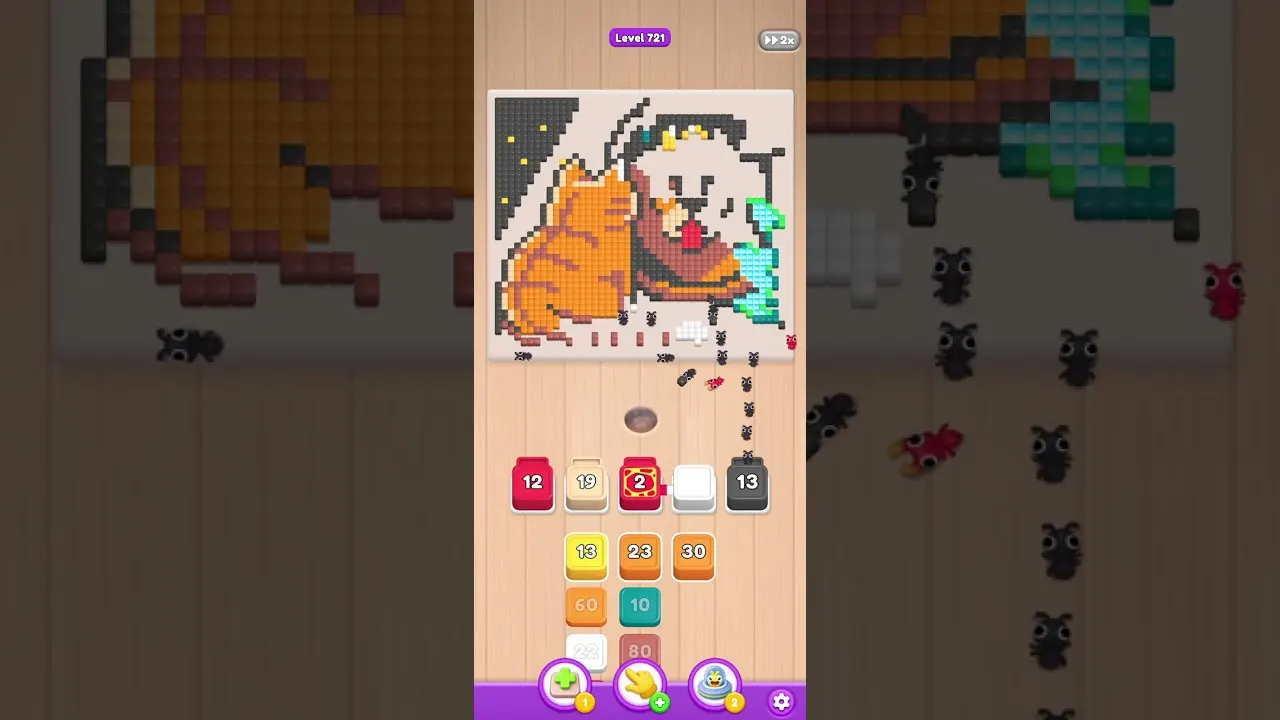
- Cycle the middle tones. Continue with green, white, yellow, teal, salmon, green, yellow, orange, white and yellow. This pass removes more of the animals while the first covered patches begin slowing individual boxes. The larger boxes leave as their accessible work completes, making room for the next colors in the sequence. Let an almost-finished box release its place before trying to add another; overlapping waiting choices will not uncover the hidden pixels any sooner.
- Use pink to open the chain. The red section becomes more prominent around the middle, when pink unlocks the fifth slot. Take that pink opportunity so the rest of the clear can use the extra place. Red in slot 1 can then sit unchanged for a long stretch because a yellow layer still covers its pixels. Keep advancing the available queue through reachable colors instead of tapping the waiting red again to try to restart it.
- Work through the red wave. Follow charcoal, teal, red, orange, salmon, red, yellow, orange, white, green and salmon through this section. Red and teal alternate around the remaining middle tones, while the white box in slot 4 stays into the endgame. Seven red boxes are concentrated in this later part of the clear and the stretch that follows. Their presence in the queue does not remove the need to clear yellow around the long-waiting first-slot red.
- Rebuild the available queue. After most of the picture has disappeared, four boxes can be selected consecutively without a required order between them. They work on different colors and do not block one another, so follow the choices actually offered rather than inventing a fixed sequence for this group. Green, teal, yellow and two orange boxes follow that group. Keep the usable positions working through these smaller remaining areas as the long tail of the queue becomes accessible.
- Close the dark outline. The final nine boxes include orange and salmon to remove the leftover middle tones. Three charcoal boxes arrive at positions 48, 52 and 55 and complete the dark outline and the sky behind the animals. Keep those charcoal choices for their late positions rather than trying to clear the whole outline early. The last box is charcoal, and the final disappearing pixel is charcoal as well, marking the end of the 55-box run.
Red Behind Yellow and the Long-Lived White Boxes
Identify which waiting box you are seeing before changing your choices. Slot 1 red cannot reach its pixels through the yellow covering, so yellow removal is what allows that counter to move again. White in slot 2 also needs its covering neighbors eaten. The white in slot 4 lasts even longer, remaining into the endgame; its presence through several later choices is expected rather than a sign that the 55-box sequence has failed.
Keep additional waiting boxes to a minimum around those fixed delays. Aim for one blocked job at a time where possible; if red and white are already parked, use the next available selections for colors that are eating now. The early four-slot limit makes this especially important before pink opens the chain. Repeated taps on red or white cannot remove their covering layers, whereas an accessible yellow or other neighboring color can keep the queue progressing.
Frequently Asked Questions
How do you beat Food Hunt level 721?
Begin the 55-box sequence with orange, salmon and teal in the left slots, then advance through the yellow and green work. Use pink to unlock slot 5 and allow the waiting red and white boxes to resume as their neighbors clear. The finishing charcoal boxes are at 48, 52 and 55.
Why does red wait so long on level 721?
The red box in slot 1 has a yellow layer over its pixels. Let yellow boxes remove that covering while the remaining positions handle accessible colors. Red resumes through that clearance, without extra taps on the stationary box.
When does the fifth slot unlock?
Pink opens the chained fifth slot around the middle of level 721. Until that choice arrives, plan the orange, salmon and teal work within 4 usable slots. Take pink when offered so the later queue gains its extra position.
Which color finishes the cat and lion picture?
Charcoal supplies both box 55 and the final pixel. Its other 2 boxes appear at 48 and 52, with orange and salmon clearing remaining middle tones around the ending. Leave the dark outline for that late charcoal work.
Read next


Stuck somewhere else? Pick another number on the Food Hunt levels page, or start with the Food Hunt walkthrough basics if the slots and boxes still feel new.