Food Hunt Level 701 Walkthrough
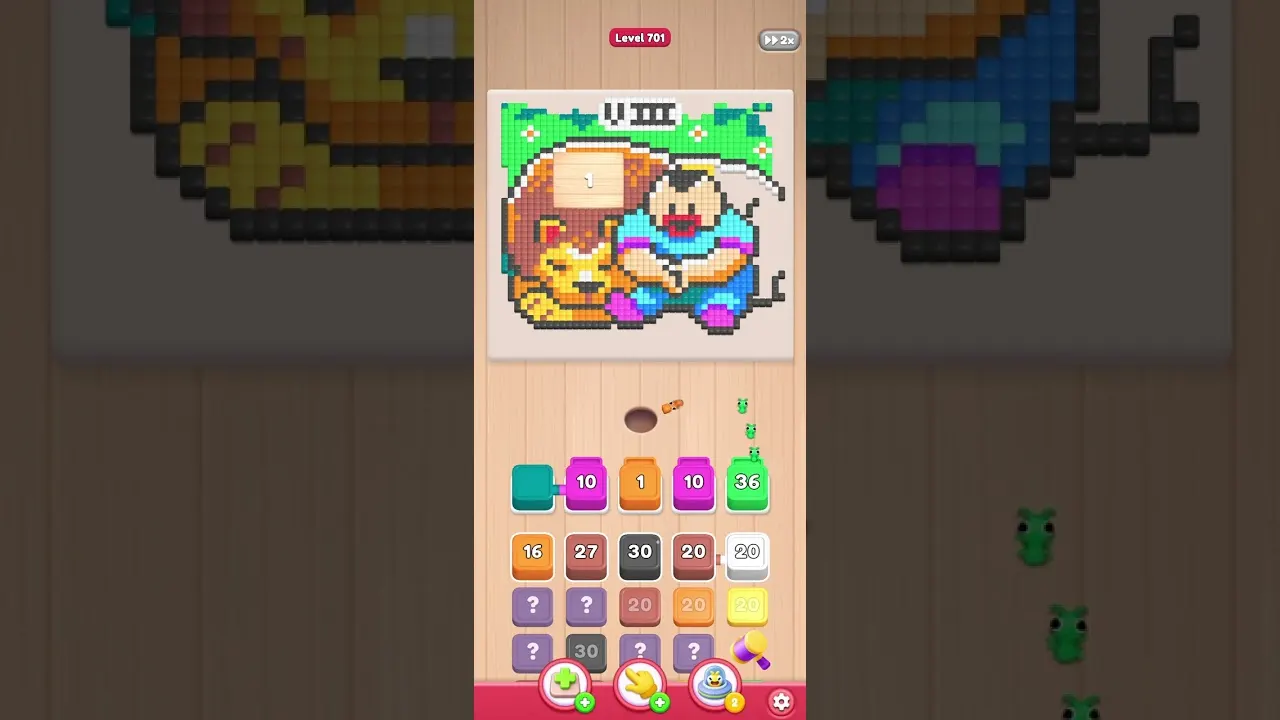
To beat Food Hunt level 701, start orange, add dark grey and pale red, then work green, white and dark blue before the sealed final shades. The scene shows a boy hugging a large lion on green grass with flowers, with a Roman numeral above and numbered wooden panels over the picture. Nine colors are involved, and pale orange, light blue and blue should wait until their surroundings are nearly gone.

The main problem is a long succession of boxes that have very little access. Even orange, the largest color, has most of its pixels covered, while dark grey is almost nine-tenths enclosed. Tapping every offered box in turn can fill all five slots before the ants have opened the layers those boxes need.
| Picture | Boy hugging a large lion on green grass with flowers, Roman numeral above and numbered wooden panels over the picture |
|---|---|
| Colors | 9 |
| Slots | 5 |
Boy and Lion Answer Key: Opening and Closing Groups
Orange, dark grey and pale red first; green, white and dark blue in the middle; pale orange, light blue and blue at the end.
These are groups to work through according to the queue, not a promise that every box can enter immediately after the previous tap. Orange needs the earliest start because it is the largest area, and dark grey has substantial work as well. Pale red has roughly half its pixels available, making it more useful early than the fully enclosed finishing colors. Introduce the middle group as space opens, rather than seating all of it together. Leave pale orange and both final blue shades until their blockers have been eaten.
Solution for the Lion Scene from Orange to Blue
- Begin the largest orange section. Put orange into a slot as soon as it becomes selectable in the queue beneath the board. It covers more pixels than any other color in the boy-and-lion picture, giving its ants the largest job. Most of those orange pixels are covered by surrounding shades, so the early start does not mean uninterrupted clearing.
Video walkthrough of level 701
The level 701 video follows the orange and dark grey opening through the middle shades to the delayed pale orange and blue sections of the boy-and-lion scene.
- Introduce the heavy dark grey work. Dark grey is the second major job and has almost nine-tenths of its matching pixels enclosed. Give it an early slot, then allow it to work slowly through access created by the surrounding clear. Dark grey itself blocks some pale orange pixels, so reducing it is also part of preparing the final color group.
- Use the open half of pale red. Pale red is roughly half covered, leaving a useful portion for its ants to begin eating straight away. Add it as the third opening color when the queue permits and the slots have room. The covered remainder becomes accessible after orange and dark grey have been reduced. While these early boxes are seated, preserve at least one free slot so a useful subsequent choice can enter instead of waiting behind a completely occupied row.
- Choose the middle colors selectively. Green, white and dark blue gain access as the early color group clears the picture. White is about seven-tenths covered, so it can still spend time waiting after its exposed portion disappears. Bring these middle shades in as the queue offers them, but avoid adding the whole group at once.
- Release the fully enclosed late shades. Pale orange, light blue and blue cannot eat any matching pixels at the start because other colors surround them completely. Keep these three selections back while orange, dark grey and the middle colors are still well above zero. Pale orange is blocked by orange, dark grey and four additional colors, so its route needs several neighboring shades removed. Once that surrounding work is nearly finished, bring the late boxes into the spaces opened by the earlier group.
- Clear the final accessible pixels. As each late box reaches zero, use its freed slot for the next remaining reachable color. The finishing group should now have a route through the layers that kept it enclosed earlier. If a counter pauses again, look for the neighboring shade still standing around its matching pixels and let that color finish first. Continue until the final pixel disappears from the boy-and-lion picture, rather than assuming a seated late box has immediate access to every last detail.
Keeping Space Beside the Long-Running Orange Box
Orange and dark grey can both spend a long time seated even though they belong in the opening. Orange has the largest matching area and much of it is covered; dark grey is almost nine-tenths enclosed. Their slow progress is a reason to protect spare space around them. Keep no more than three or four boxes seated at once, leaving one or two of the five slots available rather than filling every opening immediately.
The completely motionless late boxes have a different access problem: pale orange, light blue and blue begin with no reachable pixels at all. Pale orange is enclosed by orange, dark grey and four other colors, so a clear through just one neighbor may still leave it blocked. Keep those final shades in the queue until their surroundings are almost eaten. Taps change which boxes enter and affect the lower queue, while the picture itself changes as the ants eat its pixels. When a working box empties, use that released space for the largest currently reachable choice.
Frequently Asked Questions
How do you beat Food Hunt level 701?
Open the nine-color lion scene with orange, dark grey and pale red, then choose green, white and dark blue as they become useful. Keep one or two of the five slots in reserve and leave pale orange, light blue and blue late.
Which color should I start with for the lion?
Orange is the largest of the nine colors and should begin when it is available. Its covered pixels open gradually while dark grey and the other neighboring shades are eaten.
Why is pale orange not eating anything?
Pale orange is completely enclosed by orange, dark grey and four more colors. Continue reducing that surrounding group before bringing it in, or let those neighbors clear if its box is already seated.
What if every slot is full and nothing seems to move?
The five slots have too many enclosed boxes competing with the active colors. On the next openings, preserve one or two free places, prioritize reachable orange or other large areas, and hold pale orange and the final blues until access improves.
Do taps change what happens on the picture?
Taps select boxes and change the queue underneath the nine-color scene; the picture changes as matching ants eat pixels. Adjust choices such as white or green to their current access instead of treating the visible scene as a fixed tap sequence.
Which colors should finish level 701?
The three late priorities are pale orange, light blue and blue because each begins fully covered. Select them after orange, dark grey and the middle group have removed the surrounding layers.
Read next



Stuck somewhere else? Pick another number on the Food Hunt levels page, or start with the Food Hunt walkthrough basics if the slots and boxes still feel new.