Food Hunt Level 629 Walkthrough
Clear Food Hunt level 629 by starting white, opening grey and dark grey, and saving the heavily enclosed red area for the finish. The picture is an orange shrimp wearing light blue sunglasses on a plate, with a drink nearby and a spider hanging on the left. Seven colors make up the playable picture; white is the largest at 24 pixels out of every 100 on the field.
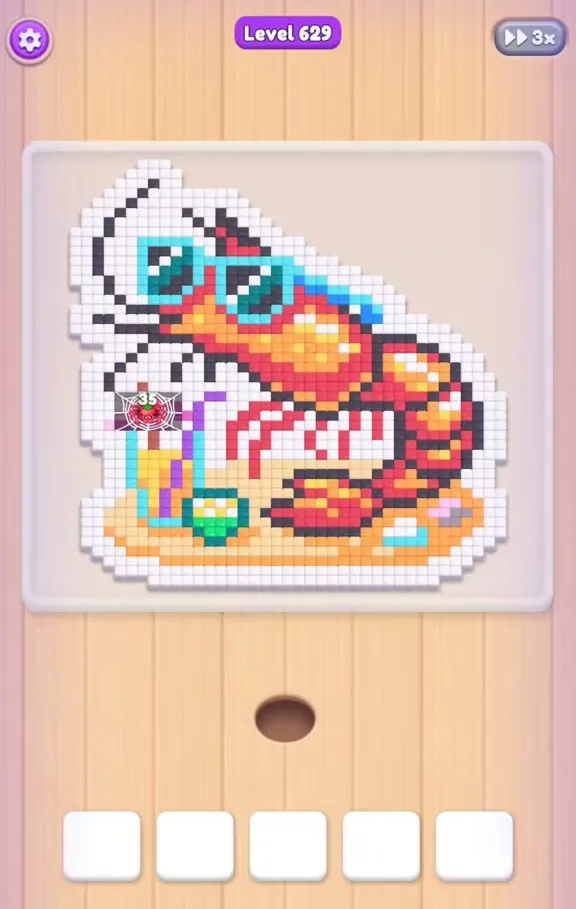
Nearly every color has substantial coverage, and five slots can fill with boxes that have little left to eat. Red has 84 covered pixels per 100, dark grey has 73, orange has 67 and grey has 51. There is also a cream area outside the picture that takes up more than a quarter of the field, but it does not need a matching box.
| Picture | Orange shrimp in light blue sunglasses on a plate, drink nearby, white background and a spider on a web at the left |
|---|---|
| Colors | 7 |
| Slots | 5 |
Shrimp Color Order: White Background to Red Finish
White, then grey and dark grey, followed by orange, pale orange and light blue, with red held for the final clear.
Read this route as a progression from the exposed background into the shrimp details. White starts the largest job; grey can then work through its accessible parts while dark grey needs more room for waiting. Orange belongs to the middle, and light blue sunglasses and pale orange details become useful after their surroundings shrink. Red is the last priority because most of its pixels remain covered until the other picture colors have been eaten. Do not include the outer cream area in your selections.
Plate and Sunglasses Walkthrough in Six Stages
- Begin with the white field. Send white into a slot at the earliest opportunity, because its 24 pixels per 100 make it the biggest playable color. The white background surrounds the shrimp and gives the ants access from much of the outside. Its large amount of matching work means it needs longer to finish than the small details. Starting it early begins opening the picture while you decide which of the grey shades has useful exposed pixels next.
Video walkthrough of level 629
The level 629 video shows the white opening, the grey and orange stages, and the late red clear around the shrimp and sunglasses.
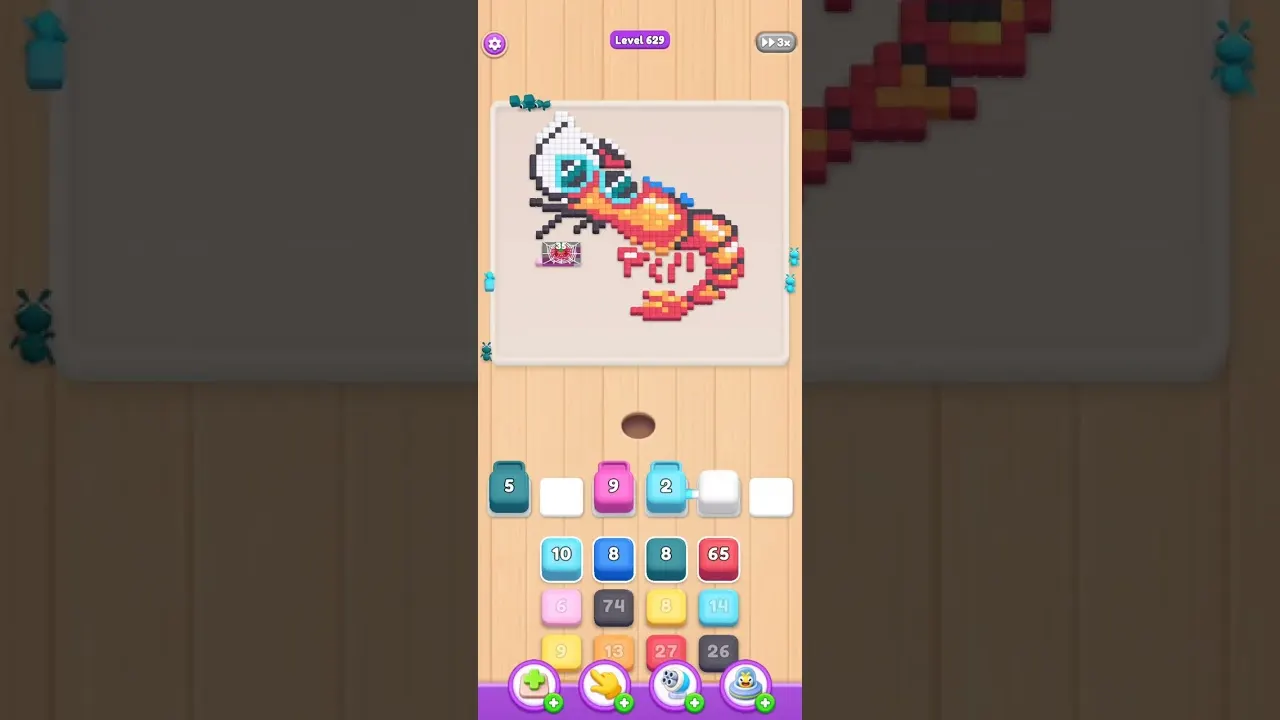
- Let grey eat its open sections. Grey has 51 covered pixels in every 100, leaving enough exposed material for an early turn after white. Select its box and allow the ants to chew through those reachable areas. White continues removing nearby background while grey waits for the remainder to open. Leave the grey box working through that change instead of treating a partly finished counter as a reason to abandon its role in exposing the shrimp.
- Allow space for dark grey. Dark grey is more restricted, with 73 of its pixels per 100 hidden by neighboring colors. Introduce it when there is enough room for a box that may remain seated while white and grey clear the approach. Its counter can fall in bursts each time another part becomes reachable. Expect the final dark grey pixels to wait for that dense surrounding layer to shrink, rather than assuming the box will empty as soon as it enters.
- Reach the orange shrimp body. Orange is covered at 67 pixels per 100, so it is better suited to the middle of the run. Much of the shrimp body becomes reachable after the white background and grey shades have been reduced. Before adding orange, check that you have not accumulated more than three waiting boxes in the slots. Its clearing is linked with the neighboring red and pale orange areas, so progress through the body also matters for those later details.
- Clear the glasses and pale details. Light blue marks the shrimp's sunglasses and is a relatively small area within the picture. It becomes available after orange and the grey surroundings have been eaten back. Handle pale orange in the same stage, since these shades make up smaller details that clear readily once exposed. Give them their slots when the larger areas are almost gone, rather than filling space with the glasses color while its surrounding pixels still prevent access.
- Keep red for the final opening. Red has the strongest listed coverage, at 84 pixels out of every 100, and needs the late turn. White, dark grey and the other surrounding picture colors all restrict its access earlier in the run. Once red has entered at this late stage, let it wait while any remaining neighbors disappear. After white, dark grey, grey, orange, pale orange and light blue have cleared, the red area is fully exposed and can finish the shrimp picture.
Red Blockage or Empty Cream Space on Level 629?
The cream region can make this level look unfinished even when you are following the right colors. It occupies 28 pixels out of every 100 on the field, but lies outside the playable picture and has no matching box to wait for. Focus on the white background within the picture and on the shrimp's seven colors. Leaving that outer region alone is part of the clear.
For an actual stalled counter, red is the main suspect: 84 of its pixels per 100 are still covered at the start. Dark grey at 73 and orange at 67 also pause more readily than grey at 51. Keep waiting selections to one or two at a time where possible, with other spaces supporting reachable colors such as white. If red comes up too soon, postpone the tap and continue opening its surroundings; a red counter already in a slot will resume as access improves.
Frequently Asked Questions
How do you beat Food Hunt level 629?
Use white to clear its 24-per-100 background area, then work grey, dark grey and the orange shrimp body. Save red, with 84 covered pixels per 100, until the smaller pale orange and light blue details have opened.
Which color should I choose first for the shrimp?
White is the best opening because it covers 24 pixels per 100, more than any playable rival here. Starting that background box helps expose grey, orange and red instead of leaving the largest job until late.
Why does red stay in a slot for so long?
Red begins with 84 of its pixels per 100 covered, including areas blocked by white and dark grey. Keep clearing those neighboring colors so the ants can reach the remaining red rather than expecting an immediate drop to zero.
What is the cream area around the picture?
Cream occupies 28 pixels per 100 outside the playable picture and has no box assigned to its removal. Clear the seven picture colors, starting with white, without waiting for a cream selection.
How do I avoid filling all five slots?
Limit waiting boxes to one or two where possible and use other spaces for exposed white or grey. Postpone red and heavily covered dark grey when they appear too early, so five seated boxes do not prevent the next useful color from entering.
Read next


Stuck somewhere else? Pick another number on the Food Hunt levels page, or start with the Food Hunt walkthrough basics if the slots and boxes still feel new.